Level 178 walkthrough
Bus Rush Fever Level 178 Walkthrough
Park same-colored vehicles into slots to pick up matching passengers.
Level Brief
Level 178
Video + StepsPark same-colored vehicles into slots to pick up matching passengers.
- Stage
- 178
- Format
- Video + Steps
- Updated
- 2026-05-19
Level 178 Walkthrough
Level 178 is about steady slot management: Park same-colored vehicles into slots to pick up matching passengers. The safest approach is to make each parking move only when it supports the next visible passenger group.
Use the order below as the main route through the stage. If your layout has shifted after a game update, follow the same color-matching logic and keep the most flexible slots open until the passenger flow is clear.
Level Snapshot
- Objective: Park same-colored vehicles into slots to pick up matching passengers.
- Difficulty: Medium
- Estimated time: 1-2 minutes
- Key mechanic: Matching vehicle colors to passenger colors for boarding.
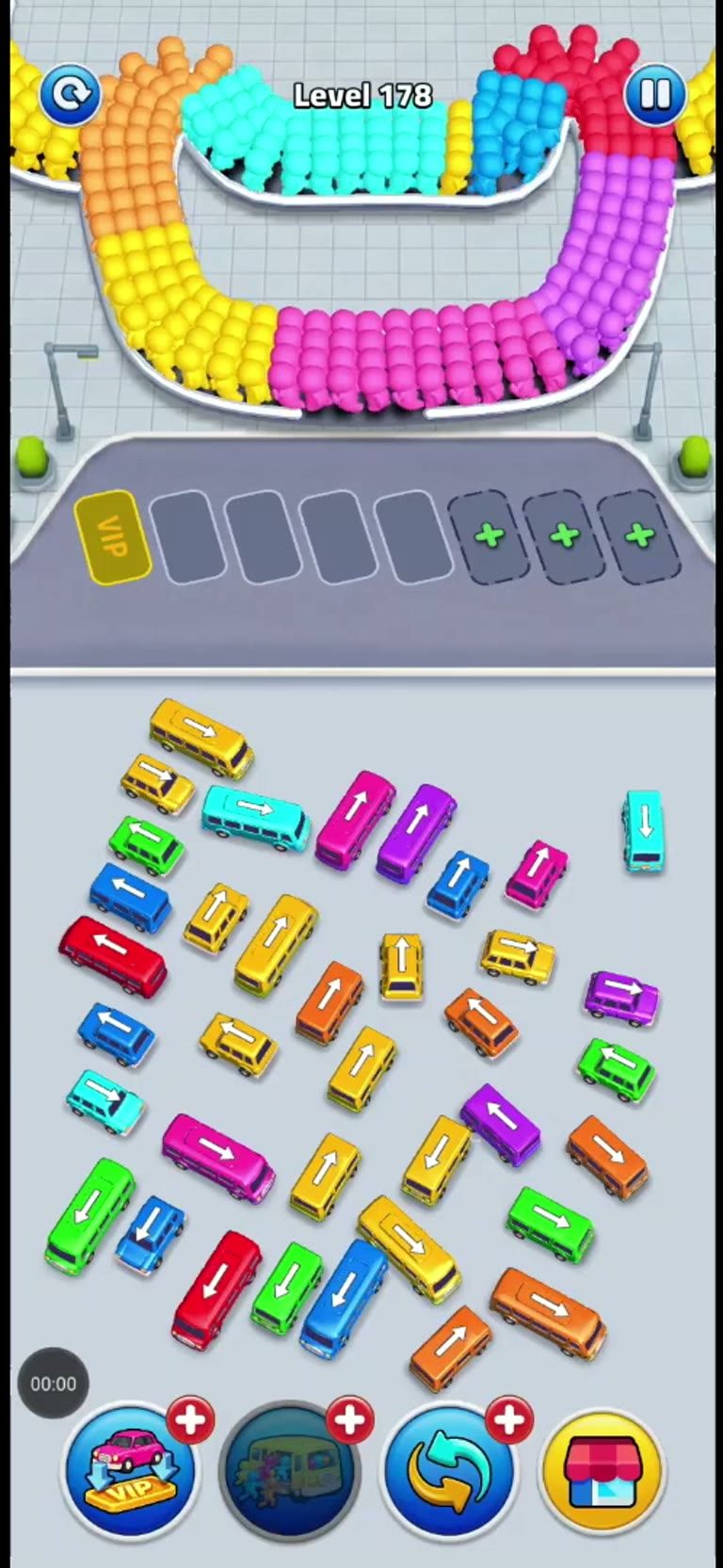
- Layout read: The level features a U-shaped track with passengers of various colors (yellow, orange, red, green, blue, purple, pink, cyan). There is one VIP slot and four plus slots. Multiple cars and buses of matching colors are available.
Best Strategy
The best strategy for Level 178 is to solve the passenger flow in small waves. Start with the vehicle that matches the first useful passenger color, then place the next vehicle only when it can start boarding soon. This keeps the parking area from locking up with vehicles that are waiting for the wrong color.
Treat VIP and plus slots as flexible parking tools. A VIP slot is useful for the opening move, while plus slots give you extra room when several colors appear close together. The important part is not the slot label by itself; it is whether that slot helps the right vehicle fill and leave.
Vehicle Order
- Red bus: Move the red bus into the first open slot next to the VIP slot. To begin collecting red passengers and clear space.
- Yellow bus: Move the yellow bus into the second open slot. To collect yellow passengers.
- Pink car: Move the pink car into the third open slot. To collect pink passengers.
- Blue bus: Move the blue bus into the fourth open slot. To collect blue passengers.
- Green car: Move the green car into the first plus slot. To collect green passengers.
- Purple car: Move the purple car into the second plus slot. To collect purple passengers.
- Orange car: Move the orange car into the third plus slot. To collect orange passengers.
- Cyan car: Move the cyan car into the fourth plus slot. To collect cyan passengers.
Step-by-Step Walkthrough
- Move the red bus into the first open slot. This allows red passengers to board and frees up space.
- Move the yellow bus into the second open slot. This allows yellow passengers to board.
- Move the pink car into the third open slot. This allows pink passengers to board.
- Move the blue bus into the fourth open slot. This allows blue passengers to board.
- Move the green car into the first plus slot. This allows green passengers to board.
- Move the purple car into the second plus slot. This allows purple passengers to board.
- Move the orange car into the third plus slot. This allows orange passengers to board.
- Move the cyan car into the fourth plus slot. This allows cyan passengers to board.
- Once a vehicle is full, it will drive away, freeing up its slot. This is the natural progression of the level as passengers are collected.
- Continue to fill remaining slots with any available matching vehicles. To ensure all passengers are collected and the level is cleared.
Common Mistakes
- Avoid this: Attempting to park a vehicle before enough passengers of that color are available.
- Avoid this: Overlooking the VIP slot, which can be used for any color if needed, but is best used for a high-priority color.
- Avoid this: Blocking the path of other vehicles with poorly placed cars.
A useful habit is to pause for a moment after each vehicle leaves. That empty slot is often the difference between a clean clear and a jammed board. If two colors are visible at once, prioritize the one with the most passengers already waiting.
Troubleshooting
- The track is filling up with passengers, and no vehicles are available to pick them up: Check if any parked vehicles are already full and have driven away. If not, ensure you are parking the correct color vehicle in an available slot.
- A vehicle is full, but not driving away: This is unlikely, as vehicles automatically depart once full. Ensure the vehicle is indeed full and not obstructed.
- A vehicle is parked but passengers are not boarding: Move or wait for a vehicle that matches the visible passenger color, because mismatched passengers will not board.
- All slots feel blocked: Let the vehicle closest to filling leave first, then use the open slot for the next matching color.
- The final passengers are stuck: Scan the remaining vehicles by color and place the one that matches the passengers still waiting.
FAQ
Q: What is the purpose of the VIP slot?
A: The VIP slot can be used for any color of passenger, offering flexibility in your strategy.
Q: What do the plus symbols on the slots mean?
A: The plus symbols indicate additional parking slots that can be used for any color of passenger.
Q: What happens if I park the wrong color vehicle?
A: The passengers will not board, and the vehicle will remain in the slot until you can move it or it is cleared by other means. It’s best to avoid this by carefully matching colors.
Q: What is the goal of Level 178?
A: Park the right vehicles so same-colored passengers can board, fill the vehicles, and clear the level.
Q: Should I use the VIP slot first?
A: Use the VIP slot early when it helps the first passenger color, but keep watching the next colors before filling every slot.
Final Tip
Always match the vehicle color to the passenger color for efficient boarding. The cleanest clears come from matching the current passenger color first, then immediately using the next free slot for the following vehicle.
Comments (0)
If your Level 178 layout is different, describe what you see and upload a screenshot. Fresh player notes help keep this guide useful after game updates.
No player notes yet. Ask a question or share what changed in your layout.