Level 309 walkthrough
Bus Rush Fever Level 309 Walkthrough
Park vehicles into their right parking slots to pick up passengers and clear the level.
Level Brief
Level 309
Video + StepsPark vehicles into their right parking slots to pick up passengers and clear the level.
- Stage
- 309
- Format
- Video + Steps
- Updated
- 2026-07-08
Level 309 Walkthrough
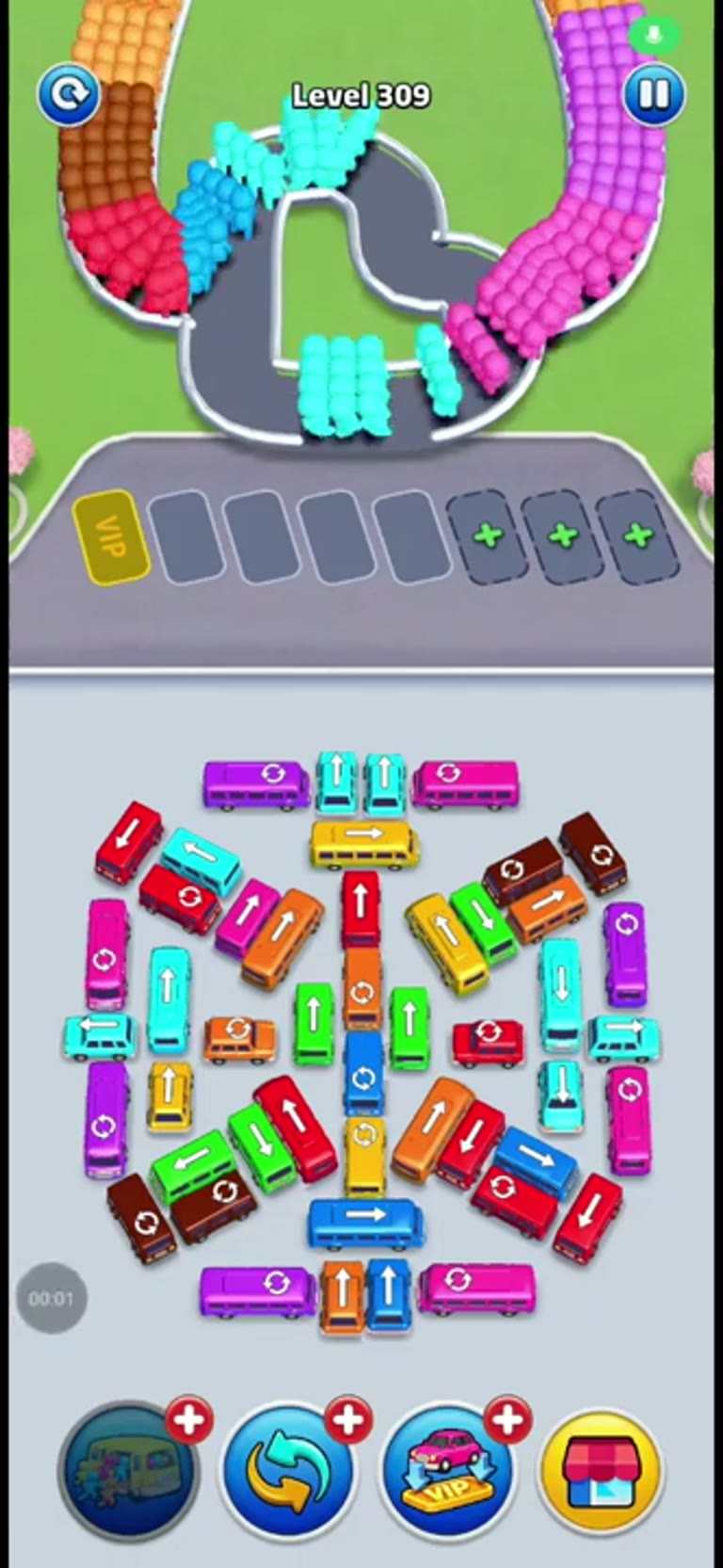
Level 309 is about steady slot management: Park vehicles into their right parking slots to pick up passengers and clear the level. The safest approach is to make each parking move only when it supports the next visible passenger group.
Use the order below as the main route through the stage. If your layout has shifted after a game update, follow the same color-matching logic and keep the most flexible slots open until the passenger flow is clear.
Level Snapshot
- Objective: Park vehicles into their right parking slots to pick up passengers and clear the level.
- Difficulty: Medium
- Estimated time: 1-2 minutes
- Key mechanic: Matching vehicle colors to passenger colors and strategically clearing paths.
- Layout read: The level features a VIP slot, several regular parking slots, and plus slots. Passengers are arranged in a U-shaped path, with various colors including purple, pink, orange, yellow, green, blue, and red. Vehicles of corresponding colors are available to be parked.
Best Strategy
The best strategy for Level 309 is to solve the passenger flow in small waves. Start with the vehicle that matches the first useful passenger color, then place the next vehicle only when it can start boarding soon. This keeps the parking area from locking up with vehicles that are waiting for the wrong color.
Treat VIP and plus slots as flexible parking tools. A VIP slot is useful for the opening move, while plus slots give you extra room when several colors appear close together. The important part is not the slot label by itself; it is whether that slot helps the right vehicle fill and leave.
Vehicle Order
- Purple bus: Move the purple bus into the VIP slot. The VIP slot is the first available slot and can take the purple bus, allowing it to pick up purple passengers.
- Pink bus: Move the pink bus into the second parking slot. This allows the pink bus to pick up pink passengers and clears space.
- Orange bus: Move the orange bus into the third parking slot. This allows the orange bus to pick up orange passengers.
- Yellow bus: Move the yellow bus into the first plus slot. This allows the yellow bus to pick up yellow passengers.
- Green bus: Move the green bus into the second plus slot. This allows the green bus to pick up green passengers.
- Blue bus: Move the blue bus into the third plus slot. This allows the blue bus to pick up blue passengers.
- Red bus: Move the red bus into the fourth plus slot. This allows the red bus to pick up red passengers and clear the remaining path.
Step-by-Step Walkthrough
- Move the purple bus into the VIP slot. This is the first available slot and allows the purple bus to collect its passengers.
- Move the pink bus into the second parking slot. This collects pink passengers and frees up space.
- Move the orange bus into the third parking slot. This collects orange passengers.
- Move the yellow bus into the first plus slot. This allows the yellow bus to collect its passengers.
- Move the green bus into the second plus slot. This collects green passengers.
- Move the blue bus into the third plus slot. This collects blue passengers.
- Move the red bus into the fourth plus slot. This collects the final set of passengers and clears the level.
Common Mistakes
- Avoid this: Parking a vehicle in a slot that is not its matching color.
- Avoid this: Not considering the path needed to move vehicles to their slots, leading to blockages.
- Avoid this: Forgetting to match the vehicle color to the passenger color.
- Avoid this: Attempting to park a vehicle before its corresponding passengers are accessible.
A useful habit is to pause for a moment after each vehicle leaves. That empty slot is often the difference between a clean clear and a jammed board. If two colors are visible at once, prioritize the one with the most passengers already waiting.
Troubleshooting
- A vehicle is blocked and cannot reach its designated slot: Try moving other vehicles out of the way or re-evaluate the parking order to create a clear path.
- The player is unsure which vehicle to park next: Look for vehicles that are easily accessible and have their corresponding passengers nearby. Consider which parking slot will become available next.
- A vehicle is parked but passengers are not boarding: Move or wait for a vehicle that matches the visible passenger color, because mismatched passengers will not board.
- All slots feel blocked: Let the vehicle closest to filling leave first, then use the open slot for the next matching color.
- The final passengers are stuck: Scan the remaining vehicles by color and place the one that matches the passengers still waiting.
FAQ
Q: What is the purpose of the VIP slot?
A: The VIP slot is a designated parking slot that can be used for any vehicle, but it’s often best to use it for the first vehicle to establish a clear path.
Q: What do the plus signs on the slots mean?
A: The plus signs indicate additional parking slots that can be used for vehicles.
Q: How do I get the passengers to board the bus?
A: Once a vehicle is parked in its right parking slot, the passengers of that color will automatically board the vehicle.
Q: What is the goal of Level 309?
A: Park the right vehicles so same-colored passengers can board, fill the vehicles, and clear the level.
Q: Should I use the VIP slot first?
A: Use the VIP slot early when it helps the first passenger color, but keep watching the next colors before filling every slot.
Final Tip
Always try to clear paths for vehicles that are most difficult to access first. The cleanest clears come from matching the current passenger color first, then immediately using the next free slot for the following vehicle.
Comments (0)
If your Level 309 layout is different, describe what you see and upload a screenshot. Fresh player notes help keep this guide useful after game updates.
No player notes yet. Ask a question or share what changed in your layout.